




.svg)




Data quality checks that run where your data lives, at the layer people and agents query
Imagine a top global bank consolidating its deposit accounts onto a private-cloud lakehouse. The deposits domain alone generates 12 to 13 TB of new data each day. Analysts, BI dashboards, and a growing number of AI agents reach that data through one entry point, an Apache Kyuubi SQL gateway. When a deposits table arrives incomplete or changes shape, an analyst can catch it before a report goes out. An agent that reads the same table acts on it at once and never stops to check.
That shift breaks the traditional approach to data observability. Most tools pull data out of the source and into their own compute to inspect it. On a platform that processes 25 TB a day inside a private cloud, governed by OAuth and fine-grained authorization, moving data out to check it costs too much and bypasses the controls the platform exists to enforce.
Approaches that infer health from query logs never measure the data itself, and quality tools built into a single vendor’s platform stop at that platform’s boundary. Enterprises running open, self-managed lakehouses alongside cloud platforms need checks that run where the data lives, through the same gateway their users and agents already query.
ADOC 26.10.0 adds Apache Kyuubi as a data source with pushdown execution. ADOC crawls the databases behind your Kyuubi gateway, then sends profiling, data quality, and reconciliation queries through Kyuubi, which runs them on its own engines inside your cluster. Those checks return metrics, not records, and your data stays in place under your authentication and authorization controls. Kyuubi assets join the same ADOC catalog as your cloud warehouse and lakehouse sources, so one team monitors private-cloud and cloud data with one set of policies.
Why Kyuubi environments are hard to observe
Apache Kyuubi is a distributed, multi-tenant gateway that provides serverless SQL on lakehouses. Users and BI tools query through JDBC and ODBC, with engines such as Apache Spark, Apache Flink, and Trino running underneath. It queries traditional warehouses like Apache Hive alongside lakehouse formats such as Apache Iceberg, Apache Hudi, and Delta Lake.
That single entry point makes Kyuubi efficient for the teams that query through it. It also creates a blind spot for the teams responsible for data reliability.
The same problems show up wherever Kyuubi runs at scale.
- No one inventories what sits behind the gateway. Kyuubi exposes many databases and tenants through one endpoint, but nothing tracks which tables exist, what changed, or when.
- Teams assume quality instead of measuring it. Without profiling and rules running against Kyuubi-served tables, a query that succeeds gets treated as proof that the data is correct.
- Pulling data out to check it is off the table. Object storage, OAuth, and fine-grained authorization mean an external tool needs metastore credentials, storage credentials, and enough compute to process terabytes a day.
- Legacy connectors don’t fit the new stack. Hive connectors built for Kerberos and HDFS cannot reach an Iceberg platform on object storage that authenticates through OAuth.
- Incident response starts from zero. When a downstream report or agent returns an unexpected result, teams have no historical profile or quality trend to compare against.
Where ADOC fits in Kyuubi environments
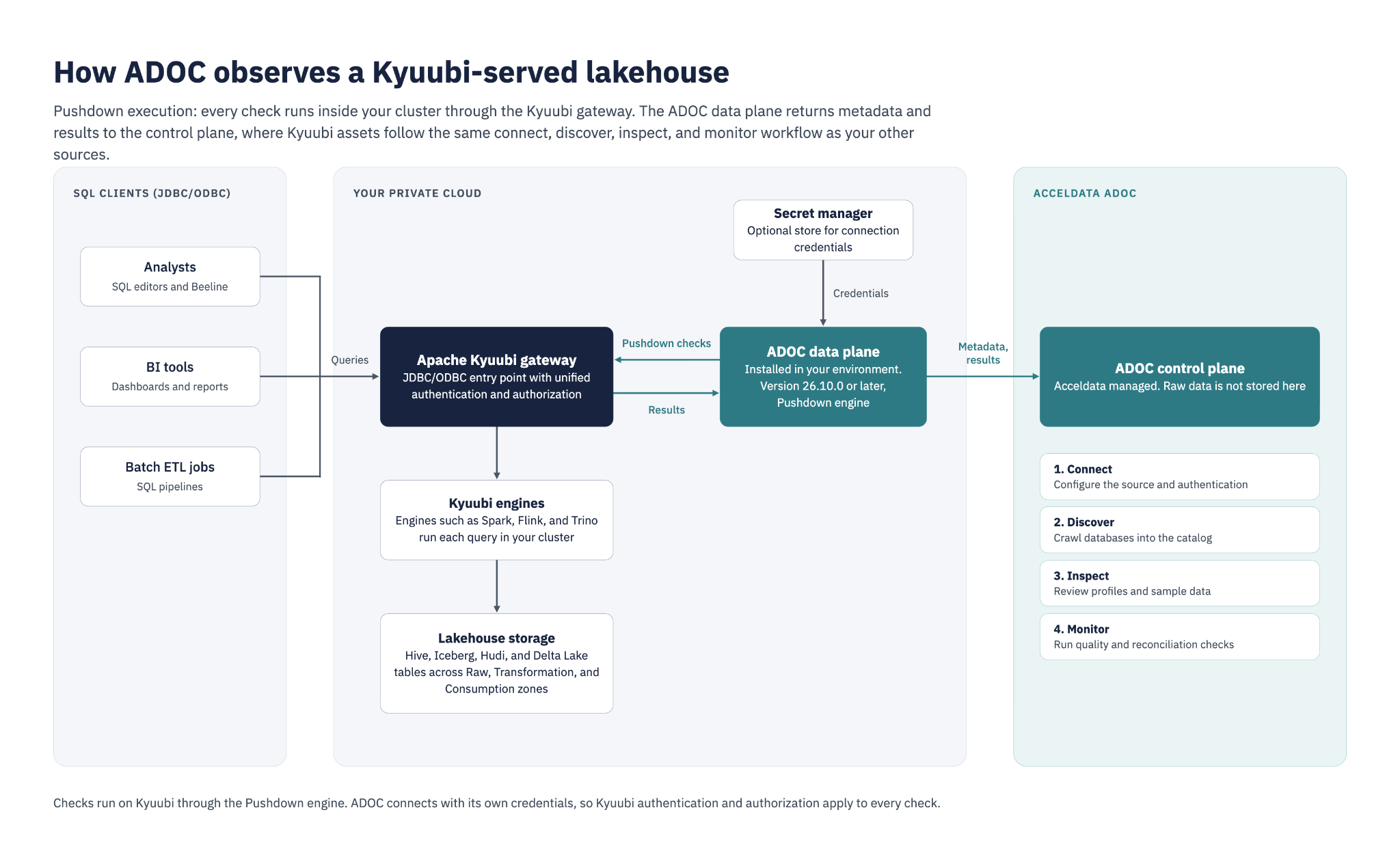
ADOC sends every check to Kyuubi, which runs it on its own engines inside your cluster. The ADOC data plane, installed in your environment, returns metadata and results to the Acceldata control plane.
Kyuubi assets follow the same four-stage workflow as every other source ADOC monitors.
Connect
ADOC connects to Kyuubi over JDBC with either Keycloak OAuth2 (client ID and secret) or a JDBC username and password. You can store these credentials in a secret manager instead of entering them in ADOC. The connector requires an ADOC data plane at version 26.10.0 or later.
Discover
ADOC crawls the databases you select behind your Kyuubi gateway and indexes their tables and schemas into a searchable catalog. Kyuubi-specific type mappings translate column types into the catalog, so the profiles and rules built on top start from correct metadata. You schedule crawls by time zone, and ADOC notifies your chosen channels when a crawl fails.
Inspect
ADOC sends profiling queries to Kyuubi, which runs them inside your cluster and returns statistics that give your team a baseline for each table’s shape and health. When a profile or rule result needs a closer look, you can review sample data from the table. Sample queries also run through Kyuubi as pushdown queries.
Monitor
You define data quality policies in ADOC and enforce them against Kyuubi tables, and reconciliation checks compare datasets for consistency, including row counts. Alerts on failed checks route through the same notification channels as your other ADOC sources.
Pushdown first, by design
Pushdown is the only execution engine for Kyuubi sources, and it shapes the whole integration. Kyuubi runs every profiling, sample data, quality, and reconciliation query on its own engines, and applies its unified authentication and authorization layer to every request. ADOC connects as a Kyuubi client with its own credentials and never needs direct access to your storage. Pushdown also disables record persistence for data quality results, and raw data is not stored in the Acceldata-hosted control plane.
Getting started
Kyuubi requires an ADOC data plane at version 26.10.0 or later, in a running state, with network access to your Kyuubi server and, if you use Keycloak, to your Keycloak token endpoint.
In ADOC, go to the Control Center, then Integrations, and select the Apache Kyuubi card under Add Data Source. Enter your Kyuubi JDBC URL, choose Keycloak OAuth2 or username and password authentication, store credentials in your secret manager, and select Pushdown as the dataplane engine. Then select the databases to crawl and set a crawl schedule.
After the first crawl completes, configure profiling, data quality policies, reconciliation, and alerts directly from the data source.
Full setup instructions and supported capabilities are in the ADOC documentation: https://docs.acceldata.io/adoc/documentation/apache-kyuubi
Full list of Acceldata Integrations available here.
Book a demo to see ADOC observe your Kyuubi-served lakehouse in place.